


Table of Contents
TogglePayroll and bookkeeping services are supposed to be the boring, safe part of running a business. Wages go out on time, the numbers reconcile, nothing catches fire. Then a modern award rate changes, or the ATO flags a Single Touch Payroll mismatch, or the person who has “always just handled it” hands in their notice, and you realise you never actually knew what was meant to be happening behind the scenes each pay cycle.
That gap between what business owners assume their provider is doing and what a provider should be doing is where most payroll and bookkeeping problems start. Not because anyone is being careless. Because nobody wrote the job down.

This checklist is the job description. It covers what good payroll and bookkeeping services actually include, from onboarding through every pay run and every month, and what to watch for if your current setup has quietly fallen behind.
What Payroll and Bookkeeping Services Actually Cover
Bookkeeping and payroll services get lumped together so often that most business owners assume they’re the same task done by the same person. They overlap, but each one carries its own set of obligations.

Bookkeeping is the record-keeping side of the business: every transaction, invoice, bank reconciliation, and BAS lodgement that builds the financial picture your accountant, bank, and the ATO all rely on.
Payroll is narrower but higher stakes. It’s the calculation and payment of wages, superannuation, and PAYG withholding, done correctly for every employee, on every award, every single pay run, with zero room for “close enough.”
A genuine payroll and bookkeeping services provider should be able to explain both sides clearly and tell you where the responsibility for each one sits. If a provider can’t answer that in plain language, that’s worth noting before you sign anything.
Why the Bar Has Moved in 2026
A few years ago, “get the payroll done” was a reasonable standard. It is no longer the case, because the compliance environment underneath payroll has changed faster than most in-house systems have kept up.

The Superannuation Guarantee rate now sits at 12% of ordinary time earnings, the final step in a legislated increase that took effect on 1 July 2025 and applies to all wages paid on or after that date (ATO). From 1 July 2026, Payday Super also changed how quickly that super has to move: employers must now get contributions received by the employee’s fund within seven business days of payday, rather than waiting for the old quarterly cycle (ATO).
On top of that, the National Minimum Wage sits at $26.44 per hour or $1,004.90 per week from 1 July 2026, an increase of 6%, while most modern award rates moved by a smaller 4.75% in the same review (Fair Work Ombudsman). Because the two figures differ, a flat percentage bump applied across your whole payroll is often wrong.
Add Single Touch Payroll Phase 2, which requires every pay run to report ordinary earnings, overtime, allowances, and leave as separate line items rather than one lump figure (ATO), and it’s easy to see why “our bookkeeper handles it” isn’t a full answer anymore.
The Onboarding Checklist Before Your First Pay Run
Most of the checklists people write for payroll and bookkeeping services start at the first pay run. That skips the part that actually tells you the most about a provider: how they set things up before they touch a single payslip.

If a provider skips straight to “we’ll just start running your payroll,” ask them to walk through these four points first. It’s a reasonable request, not an unusual one.
The Payroll and Bookkeeping Services Checklist for Every Pay Cycle
This is the part that should be happening automatically, every single pay run, without you having to ask. If any of these are missing, that’s a gap worth raising with your provider.

If your current provider can’t walk you through each of these when asked, that’s a sign the “compliance” you’re paying for might be assumed rather than actually checked.
The Reconciliation and Reporting You Should See Monthly
Payroll runs weekly or fortnightly, but the bookkeeping side of the relationship should produce a clear monthly rhythm. This is where problems usually surface first, because a small payroll error will eventually show up as a reconciliation that doesn’t balance.

A provider that only delivers the compliance paperwork, with no reporting layer on top, is doing the minimum. Good bookkeeping and payroll services should leave you better informed each month, not just legally covered.
The Data Security and Access Checklist
Payroll data is some of the most sensitive information your business holds: bank details, tax file numbers, and full pay history for every employee. It rarely gets its own line item on a checklist, but it should.

Signs Your Current Setup Is Falling Behind

Businesses rarely decide to change their accounting setup overnight. More often, the warning signs build gradually until the existing process becomes difficult to manage.
If month-end close is taking three or four weeks instead of five to seven days, it may point to manual reconciliations or disconnected processes. If your Xero, MYOB, or QuickBooks records regularly differ from your bank balances, those small discrepancies can become harder to resolve over time.
You may also notice that your bookkeeper or payroll contact struggles to explain changes in your numbers, or that hourly billing makes your accounting costs difficult to predict. One of these issues may be manageable. When several things start happening together, it is often a sign that your current provider or processes are no longer keeping pace with the business.
What Good Communication Looks Like With a Provider
The technical checklist matters, but the relationship layer is where most payroll and bookkeeping services actually succeed or fail day to day. A provider can tick every compliance box and still leave you in the dark.

A good provider tells you about a problem before you find it yourself, rather than waiting to be asked. They explain what changed and why in plain English, not accounting jargon, and they treat your questions as normal rather than an inconvenience. They also give you a named point of contact who actually knows your business, instead of routing you through a general inbox every time something needs attention.
If your current experience feels more like submitting a ticket than working with a team, that’s usually a service model issue rather than a people issue, and it’s worth naming directly. It’s also the standard VNC Australia builds its bookkeeping and payroll services around: registered agents and certified professionals working inside Xero, MYOB, or QuickBooks, on fixed monthly plans instead of hourly surprises.
The Full Payroll and Bookkeeping Services Checklist at a Glance
Here’s every item from above pulled into one list, so you have something to actually check off against your current provider rather than scrolling back through the article.
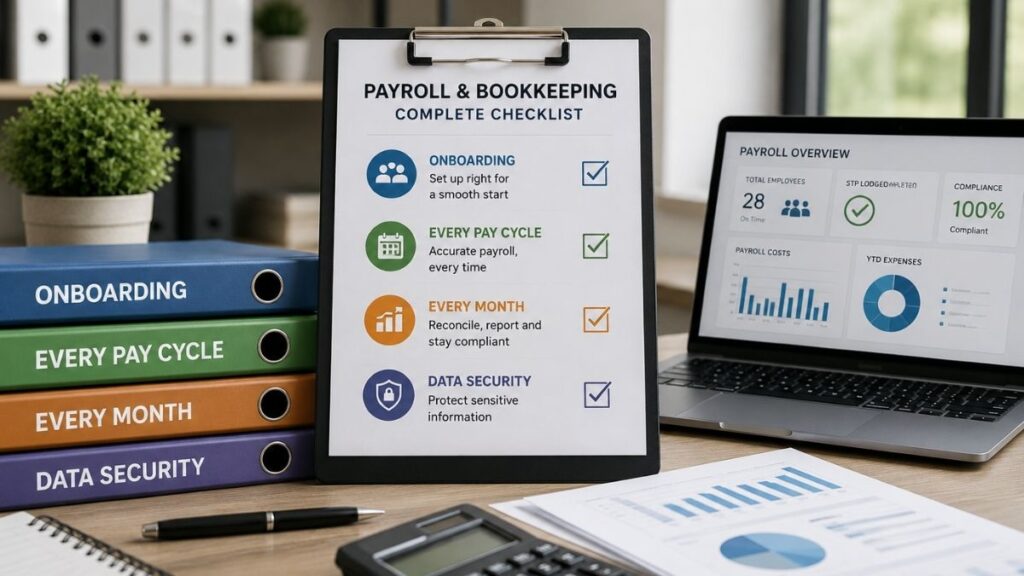
Onboarding:
- Full access handover with a clean-up plan
- Award mapping confirmed with you
- Historical STP and super reconciliation before day one
- A written scope of fees
Every Pay Cycle:
- Correct award interpretation
- Superannuation calculated at 12%, paid within the Payday Super window
- STP Phase 2 reporting on or before payday
- PAYG withholding calculated per employee
- Payslips issued within one working day
Every Month:
- Bank reconciliation
- BAS preparation
- Superannuation reconciliation
- A management report you can actually read
Data Security:
- Two-factor authentication on provider access
- A clear answer on who can see TFNs and bank details
- A documented offboarding process
Final Thoughts
Payroll and bookkeeping services aren’t the exciting part of running a business, but they’re the part that quietly protects you from underpaid super, incorrect STP reporting, and the kind of compliance mess that surfaces months after it started. Getting the numbers right every pay cycle matters. Getting the onboarding, reporting, and security behind those numbers right matters just as much, and it’s the part most businesses only notice once it’s gone wrong.
VNC Australia works with product-based businesses across Australia, and we handle the bookkeeping, the payroll outsourcing, and the dedicated support in between, so you stop guessing and start knowing.
Schedule a complimentary 30-minute consultation with the VNC Australia team: Book your call.
Frequently Asked Questions
For most Australian distributors and manufacturers between $5M and $50M in revenue, Microsoft Business Central is the strongest starting point, especially if the business already runs on Microsoft 365. Retail-heavy businesses with lighter accounting needs sometimes start with an inventory platform like Cin7 instead and move to full ERP software once financial complexity grows.
Microsoft’s current published pricing lists Essentials at $80 USD per user per month and Premium at $110 USD per user per month, with lighter-access Team Member licences at $8 USD per user per month, all billed annually. This reflects a November 2025 price update, the first change to Business Central pricing in over five years, still in effect through 2026. On top of the licence, implementation typically adds $25,000 to $150,000 or more, depending on complexity, with ongoing support usually running around 25% of the implementation cost each year. Local Australian quotes follow a similar structure once currency and regional support are factored in, so confirm the exact current figure on Microsoft’s official pricing page before budgeting. Working with an outsourced partner like VNC folds the implementation and the ongoing expertise into one engagement, rather than sourcing licence, partner, and in-house admin separately.
It depends on the channel mix. Retailers running stores, e-commerce, and marketplaces together generally need a system that unifies point-of-sale and real-time stock across every channel. Business Central with retail extensions suits store-heavy chains, while a dedicated inventory platform like Cin7 suits businesses that are almost entirely e-commerce and marketplace-driven.
Yes. Business Central includes multi-location tracking, batch and serial number tracking, barcode support, and demand forecasting natively, which makes it a strong fit for wholesalers and distributors managing complex stock across multiple warehouses.
A properly configured ERP system automates GST calculation at the transaction level and produces the reports needed for your quarterly or monthly Business Activity Statement (BAS), rather than requiring manual reconciliation between your inventory system and your accounting platform. This is exactly the kind of setup work that determines whether an ERP implementation actually saves time at month-end.
Cin7 is an inventory and order management platform built for multichannel selling. It’s strong on stock and channel integrations but doesn’t carry a general ledger, manage production costing, or handle multi-entity consolidation. Business Central does all of that natively, which is why many businesses start on Cin7 and migrate to Business Central as they scale.
The clearest sign is when your systems stop talking to each other: your accounting platform and your inventory numbers disagree, month-end close takes weeks instead of days, or nobody can confidently answer what a product actually costs to land and sell. If that sounds familiar, it’s usually a sign your business has outgrown a bookkeeping tool and needs proper ERP software.