
Xero Inventory Management: The Australian Small Business Guide
If you’ve ever stared at a spreadsheet trying to figure out where your stock went or worse, oversold a product you didn’t actually have you already know why xero inventory management matters. For Australian small business owners juggling sales, suppliers, and everything in between, getting your inventory under control isn’t just nice to have. It’s the difference between growing confidently and constantly playing catch-up.
This guide walks you through how Xero handles inventory, what it does well, where it has limits, and how to set it up the right way from the start.

What Is Xero Inventory Management, and Do You Actually Need It?
Xero is a cloud-based accounting platform used by hundreds of thousands of Australian businesses. Alongside its bookkeeping and invoicing features, it includes a built-in inventory tracking tool that lets you monitor stock levels, cost of goods sold (COGS), and the value of what’s sitting in your warehouse or storeroom.
If your business sells physical products whether you’re a tradie with equipment, a retailer shifting stock, or a wholesaler supplying other businesses then yes, you need it. Untracked inventory leads to poor cash flow decisions, inaccurate tax reporting, and a whole lot of stress come BAS time.
The good news? Xero makes it reasonably straightforward to get started, even if you’re not a numbers person.
How Xero Tracks Inventory: The Basics
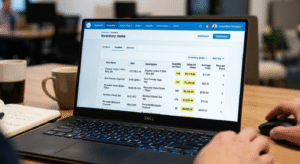
Xero uses what’s called a tracked inventory system, which means it monitors the quantity and value of each item you have on hand. When you create an inventory item in Xero, you assign it a cost price, a sales price, and link it to the right account codes. From there, every time you raise an invoice or process a purchase order, Xero automatically adjusts your stock levels.
Here’s a quick look at how it works in practice:
Setting Up Inventory Items
During your xero setup, you’ll head to the Inventory section and create individual items for each product you sell. For each item, you’ll need:
– A clear item name and code (keep these consistent it’ll save you headaches later)
– The purchase price (what you pay your supplier in AUD)
– The sales price (what you charge customers)
– The relevant income and COGS account codes
– Your opening stock quantity and value
Getting this right from day one is critical. If your opening balances are off, everything downstream will be too.
How Stock Adjustments Work
Sometimes stock goes missing, gets damaged, or you run a stocktake and find a discrepancy. Xero lets you make manual inventory adjustments to account for these situations. You simply select the item, enter the adjustment quantity, and Xero updates both the stock count and the balance sheet accordingly.
This feeds directly into your COGS reporting which matters a lot when it comes to accurate profit figures and end-of-year tax returns.
What Xero Inventory Does Well (and Where It Falls Short)
Let’s be honest Xero’s built-in inventory tool is solid for small businesses with straightforward needs, but it’s not a full warehouse management system. Here’s the breakdown.
Where Xero Shines
For most small businesses, Xero’s inventory features cover the essentials beautifully. You can:
– Track stock quantities in real time as you invoice and purchase
– See the landed cost of your inventory on the balance sheet
– Run reports to understand your best and worst-performing products
– Integrate with popular eCommerce platforms like Shopify and WooCommerce
It also ties seamlessly into your broader bookkeeping services, meaning your inventory data feeds directly into your P&L, BAS, and end-of-year financials without any manual reconciliation. That alone saves hours every month.
Where It Has Limits
Xero’s inventory isn’t designed for complex manufacturing, multi-location warehousing, or businesses with thousands of SKUs. It also doesn’t support batch tracking, expiry dates, or serial numbers natively. If your business has grown beyond the basics, you might need a dedicated inventory add-on like Unleashed, Cin7 Core, or all of which integrate cleanly with Xero.
Learn more about Xero’s inventory integrations here.
Common Mistakes Australian Businesses Make with Xero Inventory
Even with a great tool, things can go sideways if the setup isn’t right. Here are the most common issues our team sees when helping clients sort out their inventory accounting.
Not Reconciling Regularly
Inventory drift is real. If you’re not comparing your physical stock count against Xero at least quarterly (ideally monthly), small discrepancies compound into big ones. By the time you notice, untangling the mess takes significant time and usually requires a professional to fix.
Mixing Up Tracked and Untracked Items
Xero lets you create both tracked (inventory) items and untracked (non-inventory) items. A common mistake is setting up a product as untracked when it should be tracked — meaning Xero won’t adjust your stock levels when you sell it. Always double-check the item type during setup.
Getting COGS Account Codes Wrong
If your inventory items are linked to the wrong account codes, your profit and loss report will be inaccurate. This is a surprisingly common issue, especially for businesses that did their own xero setup without professional guidance. The fix sounds simple, but it often requires careful journal entries to correct historical data.
Forgetting About GST on Inventory Adjustments
In Australia, GST treatment on stock adjustments and write-offs has specific rules. Getting it wrong doesn’t just affect your books, it can affect your BAS and ATO obligations. This is exactly where working with xero inventory experts pays for itself.

How Professional Support Makes a Difference
There’s a reason many Australian businesses eventually turn to specialists for their inventory accounting. Setting up Xero correctly from the start with the right chart of accounts, item codes, and opening balances, prevents months of painful corrections later.
At VNC Australia, we work with small and medium businesses across the country to get their Xero environment set up properly, clean up existing inventory messes, and keep things running smoothly month to month. We understand Australian tax obligations, local supplier structures, and the unique pressures of running a business here.
If you’re also looking at the bigger picture, cash flow forecasting, supplier payment terms, or scaling up your operations our finance operations team can help you build a setup that grows with you, not against you.
Getting Started: A Simple Action Plan
If you’re ready to get your inventory sorted in Xero, here’s a practical starting point:
- Start by auditing what you currently have. List every product you sell, along with its current stock quantity and average cost.
- Then, decide whether you need Xero’s built-in tracking or whether an add-on is a better fit for your volume and complexity.
- From there, set up your item codes carefully, link them to the correct accounts, and enter accurate opening balances.
- Run a test create a draft invoice and a draft purchase order, and check that your stock levels update correctly before you go live.
If at any point it feels overwhelming, that’s completely normal. Inventory accounting has more moving parts than most people expect. Getting a second set of eyes from someone who knows Xero inside and out is rarely a waste of money.
Conclusion
Xero inventory management is one of the most powerful tools available to Australian small businesses when it’s set up correctly. It connects your stock levels directly to your financial reporting, keeps your COGS accurate, and saves you from the kind of end-of-year surprises that nobody wants.
The key is getting the foundation right: clean item codes, accurate opening balances, proper account mapping, and a regular reconciliation habit. Whether you’re just starting out or untangling an existing setup that’s gone sideways, the effort you put in now pays dividends every single month.
Ready to take the next step? Book a free advisory call with our team we’d love to help you set up or clean up your Xero inventory so your books actually reflect what’s on your shelves.